

GPS fleet tracking: how live location works in the fleet
The complete guide to GPS tracking in the fleet: technology, features, costs, law and introduction, with all practical questions in one place.

How does GPS fleet tracking work?
A GPS device in the vehicle (usually on the OBD port) continuously determines the position and sends it over mobile data to a web platform. There every vehicle appears live on a map, including status, trip history and estimated arrival. At TrackLog the position updates every 10 seconds.
“Where is the van right now?” GPS fleet tracking answers that question on the map: every vehicle is visible live, with status, route and estimated arrival. This guide explains how the technology works, what it does in daily work and what to watch when choosing.
What GPS fleet tracking is
GPS fleet tracking (also vehicle tracking or telematics location) means continuous positioning of company vehicles via satellite navigation, combined with software that makes those positions usable. The difference from the satnav in the vehicle: the position does not stay in the car, it is available centrally to dispatch, management or the service team, as a live map, as a logbook, as a report.
Typical building blocks are a live map with all vehicles, an automatic logbook, stop and dwell history, geofencing zones with alerts, and reports on kilometres and utilisation.
How live location works technically
The sequence is the same in most systems and consists of three steps:
1. Positioning in the vehicle. A tracker receives signals from navigation satellites (GPS, supplemented by Galileo or GLONASS) and calculates its own position, outdoors to a few metres. The device is installed either via OBD plug (plug in, done) or hardwired to the vehicle electrics.
2. Transmission over mobile data. The device sends position, speed and status via a built-in SIM to the provider’s server. The update interval is decisive here: systems that only send every 60-120 seconds often show a vehicle in city traffic several blocks off. TrackLog transmits every 10 seconds, close enough to real time that dispatch and ETA statements hold.
3. Display in the platform. The software stitches the data points into trips, classifies status (moving, dwell, parked, offline) and calculates arrival times. Good systems automatically turn that into a logbook with export, without anyone having to enter anything.
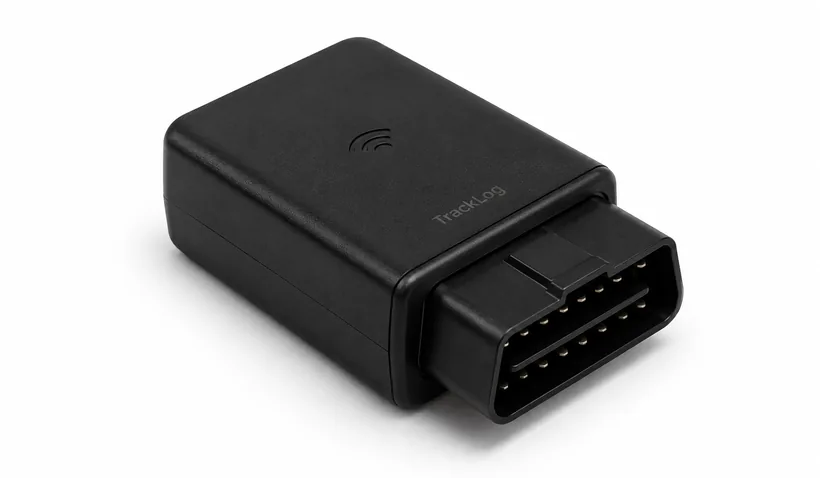
OBD plug or hardwired?
For most fleets the OBD plug is the right choice: it sits in the diagnostic port (present on almost all vehicles from model year 2004, usually in the driver’s footwell), takes power directly from the vehicle and can be moved in minutes, practical when vehicles rotate between drivers. It does not load the battery meaningfully when standing; the devices go into a sleep mode.
Hardwiring to the vehicle electrics pays in two cases: if the OBD port is needed otherwise (workshop access, other telematics) or if the device should be installed out of sight, for example with a higher theft risk. That needs some screwdriver work, depending on the vehicle self-installable or through a workshop.
How accurate is tracking really?
Under open sky the position accuracy of modern devices is a few metres; they combine GPS with further satellite systems such as Galileo and GLONASS. Two limitations belong to an honest expectation: in tunnels, car parks and tight urban canyons satellite reception drops; the device then buffers and reports back with the next clear view. And the map is only as current as the update interval: at 10 seconds practically live, at 60+ seconds visibly behind. For dispatch and ETA the interval is therefore the more important number than pure metre accuracy.
What use in daily work brings
The benefit does not come from the map itself, but from the questions it answers before anyone reaches for the phone:
- Dispatch without call-backs: anyone who can see which vehicle is where plans the next job without calling the driver.
- Reliable arrival times: the ETA comes from real GPS data instead of plan values and can be communicated to customers proactively.
- Automatic documentation: trips, stops and dwell are logged completely. The logbook writes itself and can be exported as PDF or CSV.
- Protection of the vehicles: alert on tampering with the device or unauthorised movement, including last known location.
How these effects show up in numbers depends on fleet size and usage profile. A deeper look at the measurable benefits is in 7 benefits of real-time tracking.
Typical use cases
Haulage and transport: follow tour progress live, communicate ETA to the recipient, document dwell at ramps. More on the industry page haulage.
Trades and service: which technician is closest to the job? The live map answers at a glance. Details on the trades page.
Vehicle rental: document handovers, capture mileage automatically, report border crossings via geofence. See vehicle rental.
Delivery services: reconstruct routes, evidence time on the job, distribute vehicles efficiently. More on the industry page catering.
The 13 features at a glance
Modern platforms bundle a whole toolkit around tracking. At TrackLog thirteen features are included in the base price. The main groups:
See: live map with status per vehicle (moving, dwell, parked, offline), route of every trip, stop history with dwell. That is the basis that replaces call-backs.
Prove: automatic logbook with PDF/CSV export, mileage, reports on trips and utilisation. Writes itself, without anyone entering anything.
React: geofencing zones with entry/exit alerts, customer SMS with arrival time, collision report, tamper alert with last known location.
Optimise: fuel analysis (L/100 km per vehicle and fleet), utilisation comparison, cost overviews.
The full list with screenshots is on the features page. Important when choosing a provider: check which of these features sit in the base price and which cost extra as modules. More on that in a moment.
What GPS tracking costs: prices and contract models on the market
The price range in the German-speaking market sits between 8 and 25 € per vehicle and month; the differences sit in the small print. Three models are common:
Classic subscription with commitment: 12-16 € per vehicle and month, 12-24 months’ minimum term, hardware sometimes extra or against a setup fee. The standard model of established telematics providers: calculable, but inflexible. Anyone who realises after three months that the system does not fit still pays for two years.
Hardware purchase plus software subscription: device once (often 80-150 €), plus a lower monthly fee. Pays off in the long run, but shifts risk and device maintenance to the customer.
Monthly-cancellable complete package: one price, hardware and SIM included, no commitment. That is the TrackLog model: 9.90 € per vehicle and month, all 13 features included, no setup fee, cancel monthly. The advantage sits less in the price itself than in the removed risk: test, scale and if need be leave, without sitting out a remaining term.
What to watch in a comparison: setup fees, cost per export or extra user, SIM/roaming fees and module surcharges for features that are standard elsewhere. A comparison by price, contract and installation is on the pricing page.
Law and privacy in brief
GPS tracking of company vehicles is lawful in Austria, under three conditions that fit in one sentence: documented purpose, informed team, data-sparing settings.
The GDPR requires a legitimate purpose (dispatch, logbook, vehicle protection), transparency towards drivers and defined deletion periods. In Austria the Labour Constitution Act (ArbVG) gives the works council co-determination rights over control measures; in Germany the equivalent applies under the Works Constitution Act (BetrVG). If tracking touches human dignity, a works agreement is needed (in Austria § 96 ArbVG). In companies without a works council, transparent information is mandatory and depending on design the employees’ consent is the safer path. Where private use is allowed: take private trips out of capture.
That sounds like more effort than it is. It largely matches what would be good management anyway. The full checklist, ArbVG details and the most common legal questions are in fleet management and privacy in Austria.
Note: this overview does not replace legal advice in the individual case.
Introduction in 30 days (short version)
The technical part is trivial with OBD devices; whether introduction succeeds is decided by the order:
Week 1, clarify goals: what should the system solve (call-backs, logbook, evidence, protection)? And what is expressly not done (for example performance scoring)? Write it down.
Week 2, choose a system, inform the team: select by the criteria below and involve drivers before the first device is fitted. Legally required, practically decisive.
Week 3, test with 2-3 vehicles: install, data quality, workflows and a first geofencing zone. Collect feedback.
Week 4, rollout: distribute devices, name vehicles, 30 minutes’ briefing. After that: check week-1 goals against reality after four to six weeks.
The full plan with the three most common mistakes is in introducing GPS in the fleet.
The most common objections from practice
“The team feels watched.” The most important objection, and it is not decided by the technology but by the introduction: name the purpose openly, write down what does not happen with the data (for example individual performance scoring), and involve the team before the first device is in. In practice perception often turns after a few weeks, because the most noticeable change for drivers is fewer control calls, not more control.
“Our fleet is too small for this.” The calculation does not hang on fleet size but on communication effort: anyone who makes several location calls a day or reconstructs logbooks by hand saves measurable time even with three vehicles. With monthly-cancellable models and no setup costs you can try that without risk.
“We have changing drivers and pool vehicles.” No obstacle: the vehicle is tracked, not the person. For assigning trips to people (for example for the logbook) there are driver assignments in the platform; where no assignment is needed, it stays data-sparing at vehicle level.
“Yet another system nobody uses.” A fair concern with software of any kind. The practical test: if the live map is not self-explanatory and the core questions (where is vehicle X? when does it arrive? what was driven yesterday?) are not answered in seconds, the system is the wrong choice. That is why test with two or three vehicles before rollout; see the introduction plan above.
“What about devices that are pulled or tampered with?” A residual risk remains: a plugged-in device can be pulled. Systems with a tamper alert report that immediately, including last known location. Anyone who needs more protection chooses a hidden hardwired install.
Who GPS tracking particularly pays for
Three constellations where the effect is largest: fleets with customer appointments (trades, service, care, delivery), because ETA communication and dispatch save time every day. Operations with evidence duties (haulage, construction, rental), because logbook, stop history and zone logs automate documentation. And fleets with distributed sites or pool vehicles, because only the utilisation view shows whether fleet size is right. Anyone who does not recognise themselves in any of the three but still regularly reaches for the phone to find vehicles belongs here too. The phone is the most reliable indicator.
Go deeper: the guide articles at a glance
This guide is the entry. For each sub-topic there is a dedicated practical article:
7 benefits of real-time tracking. What short update intervals change in daily work: fewer call-backs, reliable ETAs, faster dispatch. The benefits article for internal argument.
Geofencing in the fleet. Virtual zones around yard, job site or border: automatic notifications instead of looking by hand, plus a realistic take on what geofencing does for theft protection (and what it does not).
Which KPIs fleets actually need. The five metrics with which a fleet can be steered, and how to read them without breeding a data graveyard.
Introducing GPS in the fleet. The 30-day plan at full length, including team communication and the three most common mistakes.
Fleet management and privacy in Austria. GDPR, ArbVG, works agreement: the legal frame as a practical checklist.
What to watch when choosing
Five criteria separate usable systems from frustrating purchases:
- Update interval: anything over 30 seconds is too sluggish for live dispatch. 10 seconds is a good value.
- Install: OBD self-install in minutes or a workshop appointment per vehicle? In larger fleets that adds up quickly.
- Contract model: market typical is 12-24 months’ commitment. Monthly-cancellable offers take the risk out of the decision.
- Cost transparency: hardware, SIM and data volume should be in the price; hidden setup fees are a warning sign.
- Privacy: EU hosting, role and access concept, transparent introduction in the team. What to watch legally is in fleet management and privacy in Austria.
A full overview of features and prices is on the features page and under pricing.
Terms in brief
Telematics: umbrella term for the combination of telecommunications and computing in the vehicle: tracking, data transmission and analysis as one system. GPS fleet tracking is the most widespread telematics application.
GNSS: global navigation satellite systems, the collective term for GPS (USA), Galileo (EU) and GLONASS (Russia). Modern trackers use several at once for more stable positions.
OBD / OBD-II: the standardised diagnostic interface in the vehicle (mandatory for petrol from 2001, diesel from 2004). Plug-in trackers take power and ignition status from it, which is why install without a workshop is possible.
Update interval: the gap in which the device transmits its position. The most important figure for live fitness: 10 seconds feels live, 60+ seconds show the past.
Geofence: a virtual zone on the map (circle or polygon) whose crossing automatically triggers a notification. Details in the geofencing guide.
ETA: estimated time of arrival. Calculated from real GPS data it is reliable enough to communicate to customers proactively.
Conclusion
GPS fleet tracking has become technically unspectacular: plug in the device, open the platform, see the vehicles. The real difference sits in the operating model: update interval, contract commitment, cost transparency and privacy decide whether the system holds in daily work. To try it: TrackLog from 9.90 € per vehicle and month, cancel monthly, plugged in in under 1 minute. Order now.
Frequently asked questions
What do you need for GPS fleet tracking?
How accurate is live location?
Does a workshop have to install the device?
What does GPS fleet tracking cost?
Is GPS tracking of company vehicles allowed?
Does tracking also work abroad?
What happens in a dead zone or a tunnel?
How quickly can a whole fleet be equipped?
See the fleet live. Today.
The device arrives by post. Plugged in in under 1 minute, cancel monthly.
Order now